How to save AliExpress product photos in full size
Updated November 23, 2026
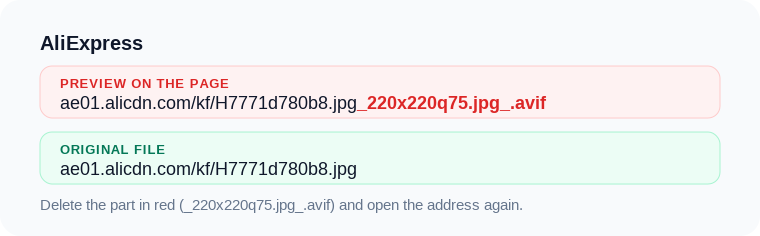
To save an AliExpress photo in full size, open it in a new tab and delete the size suffix from the URL, such as _640x640.jpg or _220x220q75.jpg_.avif. What remains is a link to the original file the seller uploaded. If you need more than a few photos, it is faster to download them all as one ZIP with an extension. Both methods are below, including the Russian site aliexpress.ru (AER).
Why “Save image as” gives you a small photo
AliExpress does not show originals on the product page. Every gallery and description image is a downscaled copy cut to fit the screen, and the size is written into the URL:
...S1a2b3c.jpg_640x640.jpg- a 640 by 640 preview;...S1a2b3c.jpg_220x220q75.jpg_.avif- a thumbnail in AVIF format;...S1a2b3c.jpg_.webp- a compressed WebP copy.
Right-click and save gives you that preview, and sometimes an .avif or .webp file that older editors cannot open. For your own marketplace listing, these images are too small.
Method 1. Remove the suffix by hand
Works on aliexpress.com, aliexpress.us and aliexpress.ru.
- Open the product page.
- Click the main photo to open the large gallery.
- Right-click the photo -> Open image in new tab.
- In the address bar find the first
.jpg(or.png) and delete everything after it. - Press Enter. The original opens, usually 800-1500 pixels on the long side, sometimes more.
- Save it with
Ctrl + S.
Example: https://ae01.alicdn.com/kf/S1a2b3c.jpg_640x640.jpg becomes https://ae01.alicdn.com/kf/S1a2b3c.jpg.
aliexpress.ru specifics
On AER the gallery and description are built differently from .com. Images may sit on other alicdn.com subdomains, and the description often loads separately as you scroll. The rule is the same: find .jpg in the URL and cut everything after it. If an image is rendered as part of the page rather than as a separate file, find it in DevTools (F12 -> Network tab -> Img filter).
Where the manual method hurts
- A listing can have 6-8 gallery photos, 5-10 variant photos and up to 30 description images. Each one needs opening, editing and saving.
- Description images appear only after scrolling, so it is easy to miss some.
- Files are saved with long random names, and later you cannot tell which one is the main photo.
- Video cannot be saved this way at all, you need DevTools.
Method 2. All photos and the video in one click
AliExpress & 1688 Helper does the same thing automatically.
- Install the extension from the Chrome Web Store. It works in Chrome, Edge, Opera, Brave and Yandex Browser.
- Open a product page on
aliexpress.ru,aliexpress.comoraliexpress.us. A Download photos & video button appears in the bottom right corner. - Click it. You get a ZIP with every gallery photo in original resolution, the pictures of each color or option in a
variantsfolder, and the video if the listing has one. Photos are numbered, main image first.
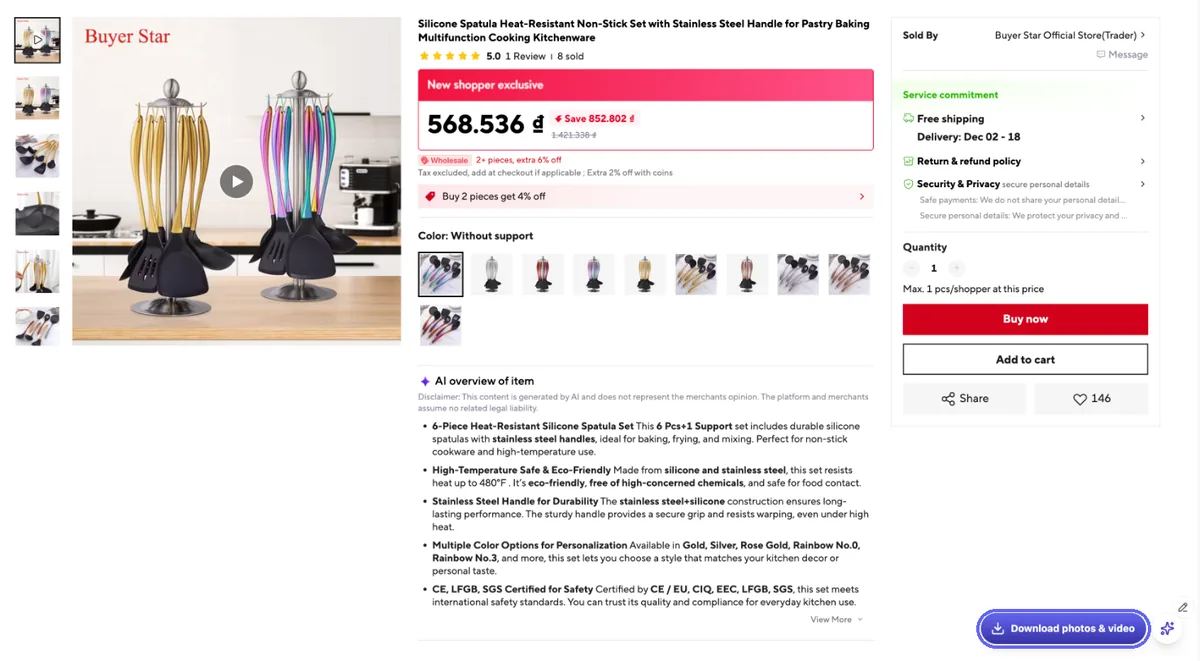
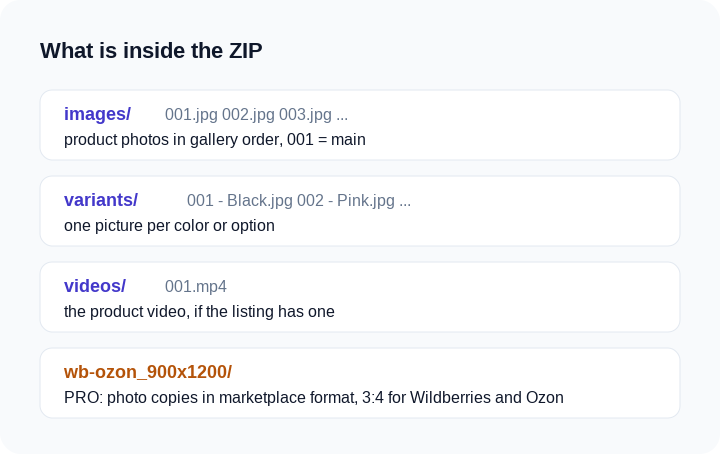
Free: 10 downloads a day, 15 with a free account. PRO ($4.99 per month) removes the limit, packs up to 50 products into one ZIP and adds copies in 3:4, 900x1200 for Wildberries and Ozon. With an account, PRO is free for 3 days.
What to do with the photos after download
- Pick the 5-8 strongest shots: main angle, details, size reference, packaging.
- Check for store logos, Chinese text or someone else’s watermark. Replace those shots or cover them with your own infographics.
- Bring them to the marketplace format: 3:4 is common for Wildberries and Ozon, a square for Amazon and many other platforms. Add space around the product rather than cropping it.
- Do not upscale beyond the original. If the source is 800 pixels and the platform asks for 1200, ask the seller for source files or shoot the product yourself.
Can you use the seller’s photos
AliExpress photos belong to the seller or the brand. Many sellers of unbranded goods do not mind resellers using them, but ask in chat first. Avoid using photos of branded products, photos with someone else’s logo and photos with models unless you have permission. Marketplaces act on such complaints.
FAQ
How do I know I saved the original and not a preview?
Look at the file URL: there should be nothing after `.jpg`. You can also check the image dimensions in file properties. Previews are usually 220, 350, 480 or 640 pixels on a side.
Why does the AliExpress photo save as AVIF or WebP?
The site serves compressed formats so the page loads faster. Remove the `_.avif` or `_.webp` suffix and the source JPG or PNG opens.
Does this work in the AliExpress mobile app?
No, the app does not show image URLs. Open the product in a desktop browser. The extension also works only in desktop browsers.
Does the extension download review photos?
No, it downloads the product's own photos and video. For reviews there is a separate AI review analysis feature that summarizes the main pros and complaints from buyers.
Why is the original still small?
The original is exactly the file the seller uploaded. If they uploaded 800x800, no method will give you more.